Second focal plane or rear focal plane is when the reticle is behind the magnification. The reticle image does not change as the magnification level is increased or decreased. First focal plane or front focal plane is when the reticle is in front of the magnification. As the power of magnification increases or decreases the reticle become larger or smaller in relation to the target. The sub tensions in the reticle will always stay the same
 Frequently Asked Questions
Answers to the most frequently asked questions about our products, purchasing and servicing details.
Electro-optics
What is the difference between first focal plane and second focal plane?
How do I set up service or obtain parts for my Electro Optic?
If you need any parts, have any questions or need service on your product please contact customer service at 603-610-3000 extension 4416. Please have your serial number and model information available. The customer service representative will create a RMA, take detailed notes of the issues you are experiencing and will provide you with a prepaid fully insured shipping label for the return shipping of your product if service is needed.
What battery does my Electro Optic take?
The Tango4, Tango6, Whiskey3, Whiskey5, Romeo3, Romeo4 and Romeo5 take a CR2032 battery. The Kilo2000 takes a CR2 battery. The Romeo7 takes a AA batteries. The Romeo1 takes a CR1632 battery.
What is your optics warranty policy?
RANGEFINDERS- I have the same rangefinder as a friend and theirs ranges substantially further. Why is this?
When attempting to zero the laser and your adjustments are locked up or do not take effect:
SIG SAUER endorses the ranging capabilities of your rangefinder in the owner’s manual and on the outside of your KILO box. The specifications noted are the maximum distance each rangefinder will achieve on trees, animals, and reflective targets. Additionally, each rangefinder will have varying but passable specifications. Range specifications are subject to manufacturing tolerance variances, with each rangefinder having a minimum and maximum range. These tolerances include: Environmental conditions, manufactured components, and atmospheric conditions. Please contact SIG SAUER CS for product specific range specifications.
.
RANGEFINDERS- I have issues ranging trees/animals
When attempting to zero the laser and your adjustments are locked up or do not take effect:
- All range finders are dependent on the target’s ability to reflect light back into the range finder’s receiver. Some surfaces known as Lambertian surfaces can diffuse the light coming back to the range finder making ranging less accurate. Since these surfaces cannot be changed, using the range finder in “hyperscan mode” which increases chances of getting a range. Hyperscan mode is utilized when holding the “RANGE” button down. The rangefinder is working at four times per second versus a single click at one time per second.
- At long distances, hyperscan mode or a tripod should be used to ensure that the target is being hit by the laser.
- Test known items and reflective targets to verify performance such as a reflective item at a known distance. Keep in mind that target color can also make a difference. You can test reticle laser alignment by using hyperscan across a stop sign and see if there is a jump before or after the reticle passes over the item.
- Rangefinders will perform differently based on changes in ambient conditions such as bright sunlight or snow, rain or fog, temperature and the reflectivity of the target being ranged. For example, at dusk and dawn your rangefinder may be able to range trees at over 1000 yards but in bright sunlight may only achieve 500 yards. If your KILO will not range at least 400 yards under normal conditions (fog and rain excluded) please contact customer service. Your product may have fallen out of alignment.
.
RANGEFINDERS - My range finder will not power on
When attempting to zero the laser and your adjustments are locked up or do not take effect:
SIG SAUER endorses the ranging capabilities of your rangefinder in the owner’s manual and on the outside of your KILO box. The specifications noted are the maximum distance each rangefinder will achieve on trees, animals, and reflective targets. Additionally, each rangefinder will have varying but passable specifications. Range specifications are subject to manufacturing tolerance variances, with each rangefinder having a minimum and maximum range. These tolerances include: Environmental conditions, manufactured components, and atmospheric conditions. Please contact SIG SAUER CS for product specific range specifications.
.
ZULU 3/5/7/9 - My binoculars seem to be out of focus and it is straining my eyes. Can I fix this?
When attempting to zero the laser and your adjustments are locked up or do not take effect:
Properly setting a diopter will allow you to look through your lenses with ease and give you a clear, sharp image.
To properly set the diopter, follow these steps:
- Look at an object approximately 100 yards away.
- Close your right eye and adjust the center focus wheel (large knob between barrels) until you find the clearest image.
- Open your right eye and close your left eye. Adjust the wheel in front of the eyecup on the right barrel until you find the clearest image. Your diopter is now set.
To make in-field adjustments for clarity, simply adjust the large center focus wheel slightly to find the clearest image.
.
ZULU 3/5/7/9 - I can’t seem to get a good image through my binoculars when wearing glasses.
When attempting to zero the laser and your adjustments are locked up or do not take effect: SIG SAUER binoculars have adjustable eyecups that twist in and out to allow you to adjust your eye relief. Try adjusting your eyecups when wearing glasses to see where you find the best image..
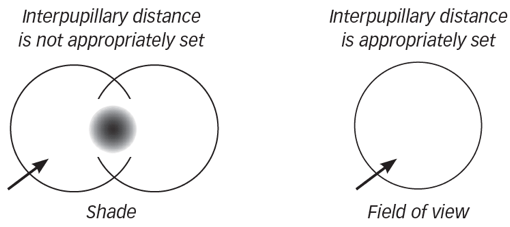
ZULU 3/5/7/9 - I have a large dark spot in the middle of my field of view.
It is possible that your interpupillary distance is not set correctly. Try adjusting the binoculars at the bridge (or hinge points) until you see one whole image.
ZULU 3/5/7/9 - I have set my eye relief and diopter correctly, but I am still seeing a “double image” when looking through my lenses.
It is possible that your binoculars are out of collimation or they are not aligned correctly. Contact customer service to have your binoculars inspected.
Misc
I lost my owners manual. How can I receive a replacement?
You can download PDF copies of all our product manuals from their respective product pages.
I have not received a reply to my email – why?
Please call Customer Service 603-610-3000, option 1 during normal business hours.
I have a question about my order – who do I contact?
If you are LE, Military or Federal please call 603-610-3000 option 4. If you are a Commercial Retailer, please contact your sales representative. For general order inquiries, contact Customer Service with your order number.
The item I purchased is not exactly what is pictured on this website or the catalog — why?
SIG SAUER, Inc. is continually making improvements and/or changes to our products to meet consumer demands and suggestions. All items shown on our website or catalog are subject to change without notice.
How do I return accessories to SIG SAUER for warranty repair or replacement?
All accessories shipped to SIG SAUER require a service request number. This number can be obtained by calling our Customer Service. Please have your model number of the returning accessory ready when the customer service rep answers. A customer service representative will guide you though this process. Accessories received without a service request number will be delayed in processing and/or returned to the sender.
Compare Products
Items